Support
Write to support at deadlinebar.app, whether you use Free or Pro. The person who built the app reads every message (bugs, ideas and questions) and replies.
Common questions
I can’t find Deadline Bar
It lives in the menu bar, at the top right of the screen; it has no Dock icon. If the menu bar is full or the item is hidden: on macOS 26 and later, open System Settings → Menu Bar and allow Deadline Bar; on earlier versions, quit an app or two to make room.
Reminders don’t arrive
Open System Settings → Notifications → Deadline Bar and turn on Allow notifications. The app shows a card in its panel when they are off. More checks, in order: Reminders aren’t arriving.
I bought Pro on another Mac
Sign in to the same Apple Account, open the upgrade window and choose Restore Purchases.
Cancel a subscription or ask for a refund
Apple handles both: cancel on your Apple Account’s Subscriptions page, and ask for a refund at reportaproblem.apple.com. When Pro ends, nothing is deleted: you choose 5 deadlines to keep working on, and the others wait, locked and without reminders.
I tried a Pro theme and want my old one back
Click the ✕ (End Trial) on the “Trying …” line at the foot of the panel. The try-on also ends by itself after 3 minutes.
Which languages is the app in?
English, for now.
Move to a new Mac
On the old Mac, Settings → General → Export…; on the new one, restore Pro first if you have it, then Import… and choose the file. The steps: Move Deadline Bar to a new Mac.
Still stuck? Report a bug or share an idea
The quickest way is from the app itself:
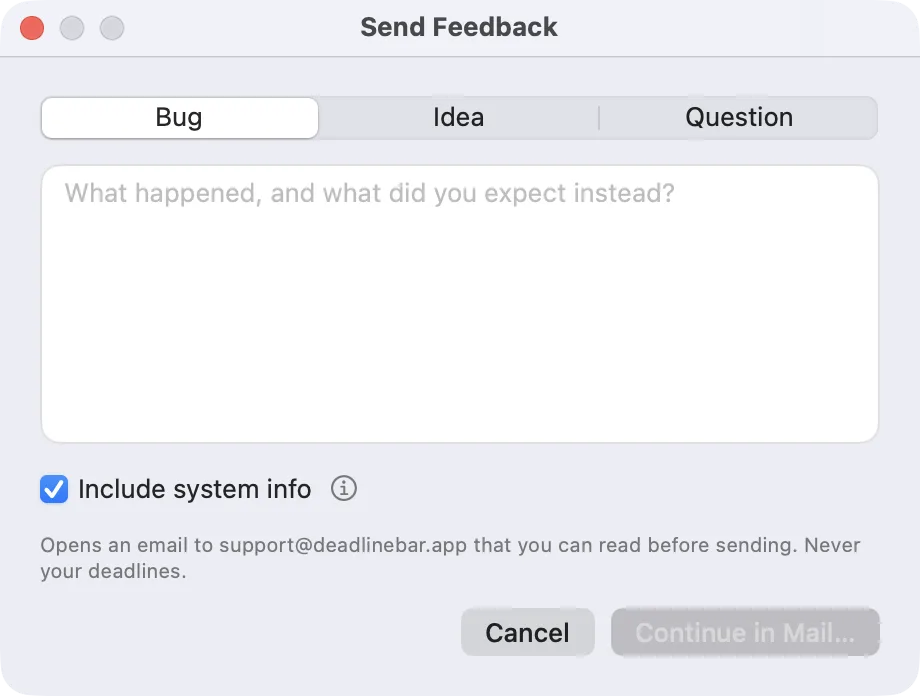
- Open the panel and choose ⋯ → Send Feedback… (also in Settings → About).
- Choose Bug, Idea or Question, and write what happened.
- Leave Include system info on: it adds the app and macOS versions, Free or Pro, how many deadlines and groups you have and a few settings. Never their titles; click ⓘ to see exactly what is sent.
- Click Continue in Mail… and send it from Mail. Nothing leaves your Mac until you do.
Writing by email instead? A bug is fixed fastest with:
- what you did, step by step, and what you expected;
- the app’s version (Settings → About) and your macOS version (Apple menu → About This Mac);
- a screenshot or a short screen recording, if you can (⇧⌘5).
If Deadline Bar quits unexpectedly or stops responding, it offers to send that report the next time it opens, with a note of your own if you like. You see everything before it goes.
More
Privacy Policy · Terms of Use · Changelog · Ideas
For help, write from the app or by email, so a person can reply with your details at hand. News and new versions: @deadlinebarapp on X